Convert Your Lab's Data to NWB with Claude Code
Converting data to NWB remains a challenge for neurophysiology labs without software engineers on staff. We have spent years lowering that bar with layered tools, each one building on the one below. PyNWB made it possible to write NWB from Python. NeuroConv builds on PyNWB to read 64+ acquisition formats, and NWB Inspector checks the finished files against community best practices.
Today we are announcing the next layer: nwb-convert, a free, open-source skill for Claude Code. It hands the conversion work to an AI agent, so a lab can convert its data through conversation. The agent inspects your files, asks questions, writes and tests the conversion code, and publishes the result on the DANDI Archive. It carries what we learned from converting data for more than 60 labs.
We presented the skill and its evaluation at SfN 2026. In our benchmark, the agent repeated one of our own published conversions, with 152 mice and 3,986 sessions, nearly perfectly from a single prompt. This post explains how to use the skill, which settings we recommend, and what the benchmark showed.
Overview
A skill is a folder of instructions and reference material. The agent loads it when the task calls for it. Ours has two parts: phases, which lead the conversation from raw files to a published Dandiset, and knowledge files, which hold the reference material the agent reads when a phase calls for it.
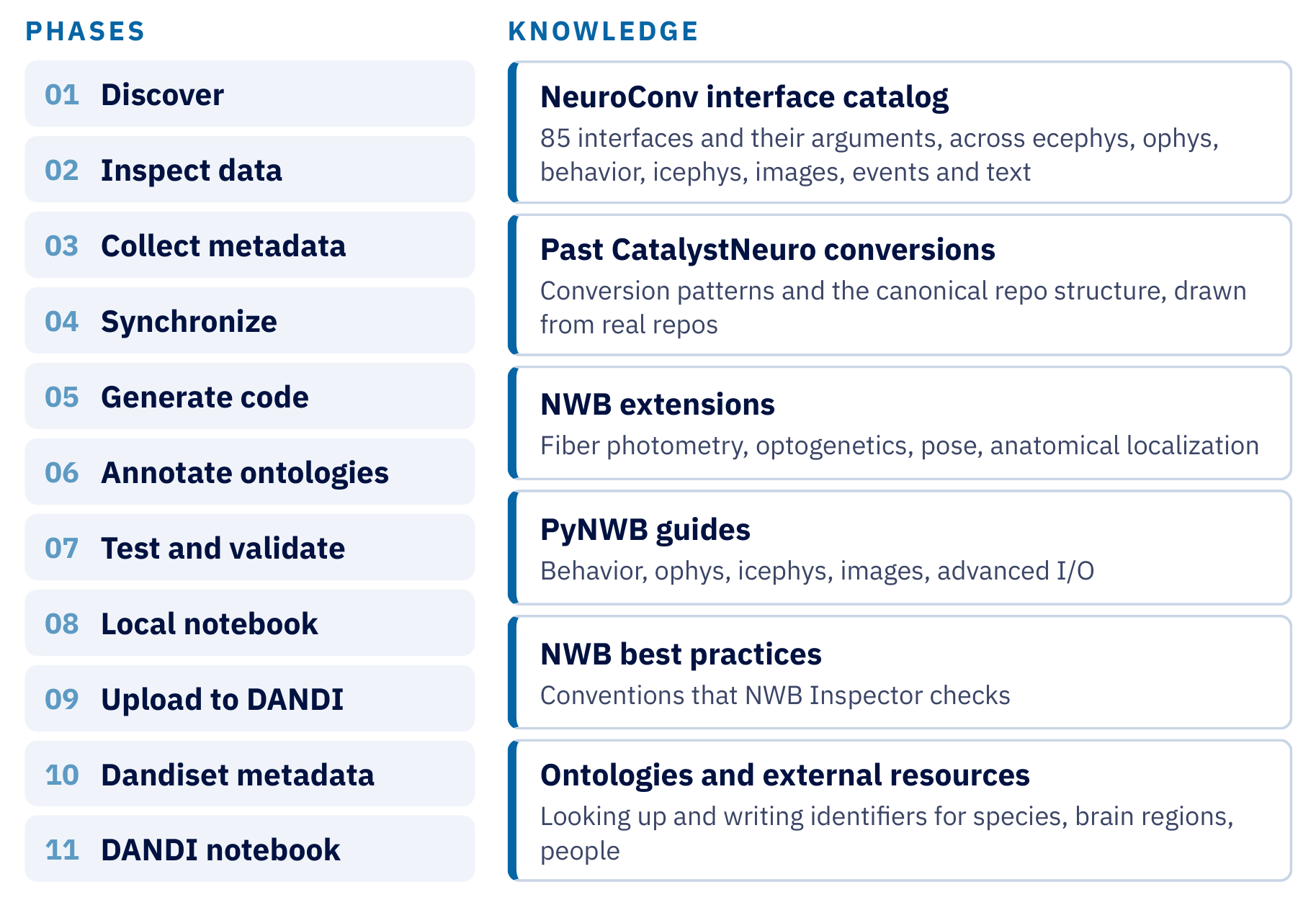
The skill is interactive by design. It tells the agent to ask the user whenever the files leave something open, such as a quirk in the data or a detail the paper never reports. You do not need to know NWB or NeuroConv to start.
The skill also takes the data all the way to publication. It knows how to upload the files to DANDI and how to fill in the Dandiset with best-practice metadata: contributors with their ORCIDs and affiliations, funding with award numbers, related publications, and ontology terms for species, brain regions and more. This metadata is often left incomplete, and it is the part that makes a dataset easy to find and to credit.
Use at CatalystNeuro
nwb-convert is part of our daily work. We have used it for 10 lab conversions so far. Those conversions covered fiber photometry, calcium imaging, Neuropixels, tetrodes, EEG and EMG, optogenetics, behavioral tasks, video with pose estimation, motion capture, IMU and audio.
Quick start
- Install Claude Code and sign in. We recommend a Claude subscription, as described under Recommended settings.
- Start Claude Code in an empty folder and add our skills:
/plugin marketplace add catalystneuro/claude-skills
/plugin install nwb-convert@catalystneuro-skills
/plugin install dandiset-metadata@catalystneuro-skills- Select the latest Claude Opus model with
/model. - Start the conversion:
/nwb-convert /path/to/your/dataThree things help the agent do a better job:
- Give it all of the data. That means the raw acquisition files, the results of processing such as spike sorting, segmentation and pose estimation, and any files with tables of metadata about the sessions, subjects and instruments.
- Give it the paper or a methods draft. Many of the details NWB asks for are already written there.
- Tell it when you do not know. The agent will ask about details the files do not contain. If you do not know an answer, say so. It will leave the field out, or mark its best estimate as inferred, and will not make up a value.
Claude Code also runs in the Claude desktop app, for people who prefer not to use a terminal.
Recommended settings
Use Claude Code with the latest Claude Opus model, which is Opus 5.5 as we write this, and the skill installed. That is the configuration we tested, and the one we use ourselves.
We recommend using the skill with a Claude subscription. Based on our usage analysis, the $20/month plan should include plenty of tokens. If you run into usage limits, the $100/month plan will almost certainly work for just about any conversion.
The model matters a great deal. A year ago, converting a whole dataset with an AI agent was barely feasible. In our benchmark, the same skill gave very different results on Opus 4.5 and on Opus 5.5:
| With the skill | Opus 4.5 | Opus 5.5 |
|---|---|---|
| Subjects converted (of 152) | 55% | 100% |
| Sessions converted (of 3,986) | 40% | 99% |
| Optogenetics sessions converted (of 2,120) | 0% | 99% |
| Behavior event times matching our conversion | 97.3% | 100% |
Benchmark
We wanted to know how close the agent gets to our own work, so we had it repeat a conversion we had already published: the Lerner Lab’s fiber photometry, optogenetics and behavior data from Seiler et al. (2022), which is DANDI:000971. The dataset has 152 mice, 3,986 sessions, several data streams and many edge cases.
- Inputs. The agent had read-only access to the lab’s raw data and the paper. Each run started from one sentence: “I’m a scientist from the Lerner Lab, please convert my data to NWB and upload it to the DANDI sandbox.”
- Sandbox. Claude Code ran in a fresh container for each run, with no route to GitHub or to the DANDI Archive, so it could not look up our conversion.
- Simulated scientist. A second model played the lab member. It held the lab’s fact sheet and answered only what it was asked.
- Two configurations. One run had the skill. The other had Claude Code alone.
- Grading. We compared each result with our published conversion, session by session.
Results
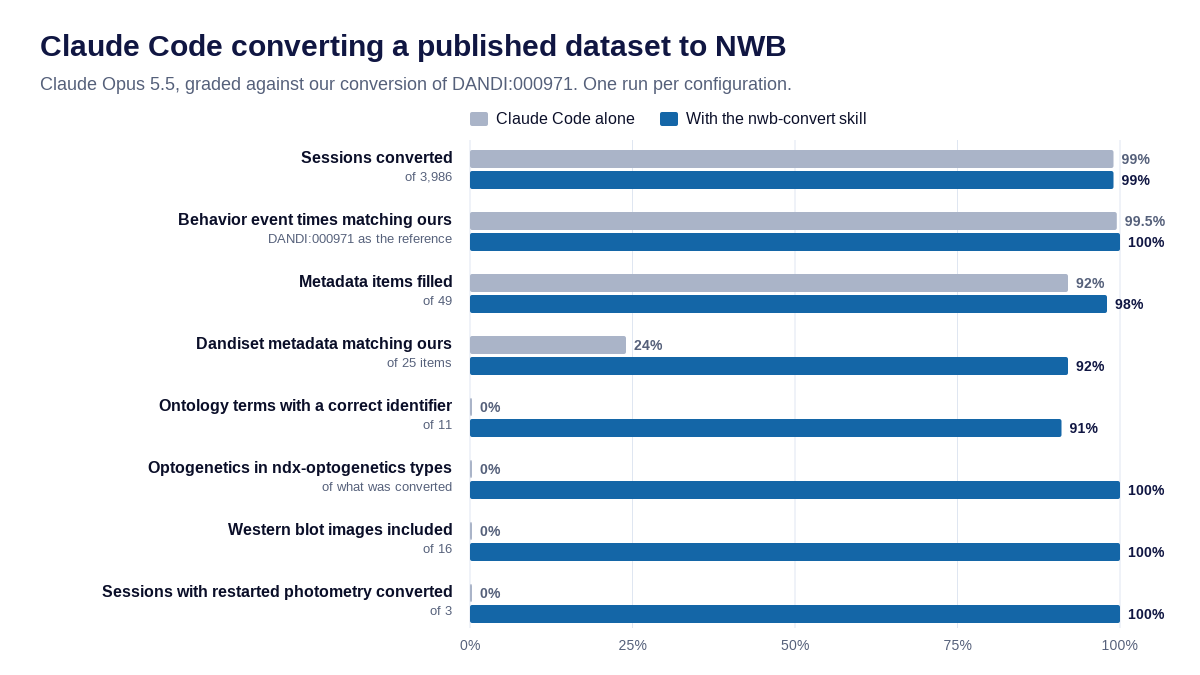
Both runs passed NWB Inspector with no critical issues and no best-practice violations.
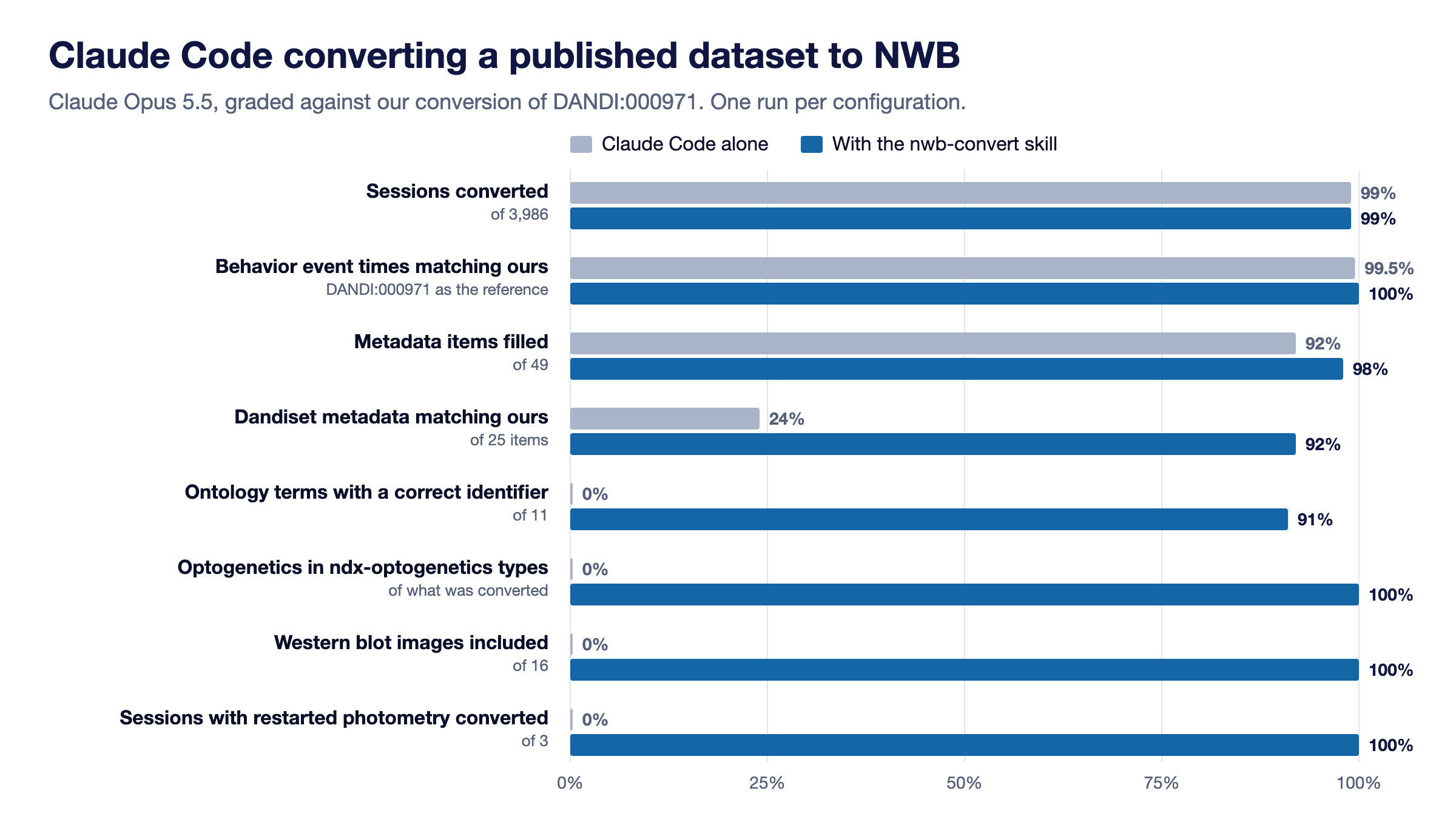
An AI agent can now convert a complex dataset nearly perfectly from a single prompt. Claude Code alone converted the data correctly but missed recent additions to the NWB ecosystem. With the skill and its maintained instructions, the agent produced a conversion close to the one we delivered ourselves, with ontology identifiers, detailed Dandiset metadata and the preferred neurodata types.
The run with the skill took about seven hours from the first message to a validated Dandiset, and much of that time went to uploading 4,205 files. Claude Code reported about $31 of usage at API prices. A subscription is billed differently from the API, as a flat monthly fee, so you might get a much better deal with a subscription.
The full results include every metadata item and edge case we graded.
Questions for the scientist
Prompted by the skill, the agent consulted the scientist on scope and on metadata. It sent seven messages with questions. Claude Code alone sent two, and decided the rest on its own.
Two of the exchanges from the run with the skill:
Agent: The paper gives 20 Hz trains of 1 s but no pulse width. Do you know it?
Scientist: The pulse width was 5 ms.
Agent: Can I annotate both DMS and DLS with Caudoputamen?
Scientist: Yes, use Caudoputamen for DMS and DLS.
The questions changed the result. Claude Code alone left out the Western blot images and several details the paper does not report, such as the stimulation pulse width and the photodetector model. The run with the skill included all of them.
Example notebooks
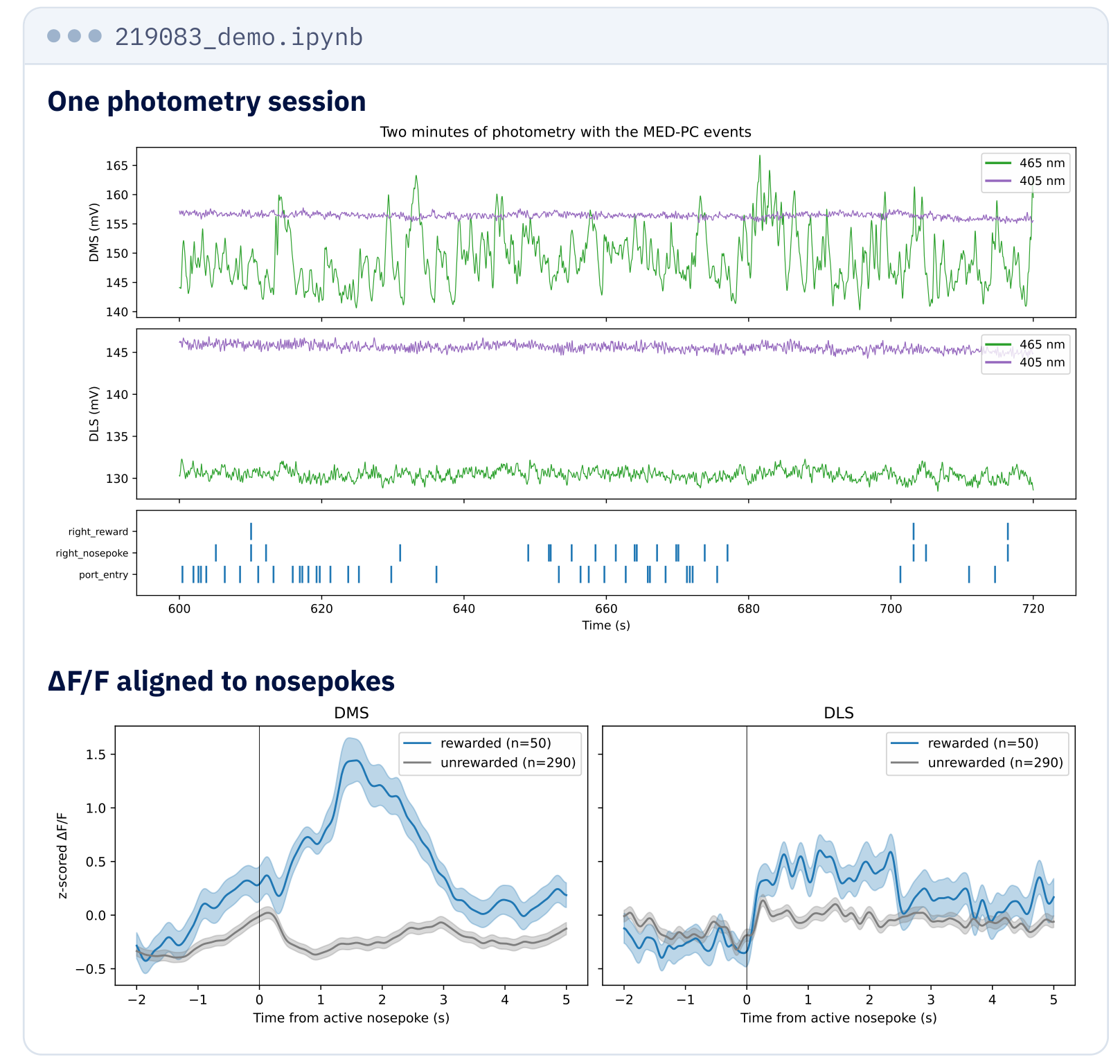
The skill ends by writing two kinds of notebook. A demo notebook reads the published Dandiset back from DANDI and plots every stream, which gives the lab a starting point for analysis.
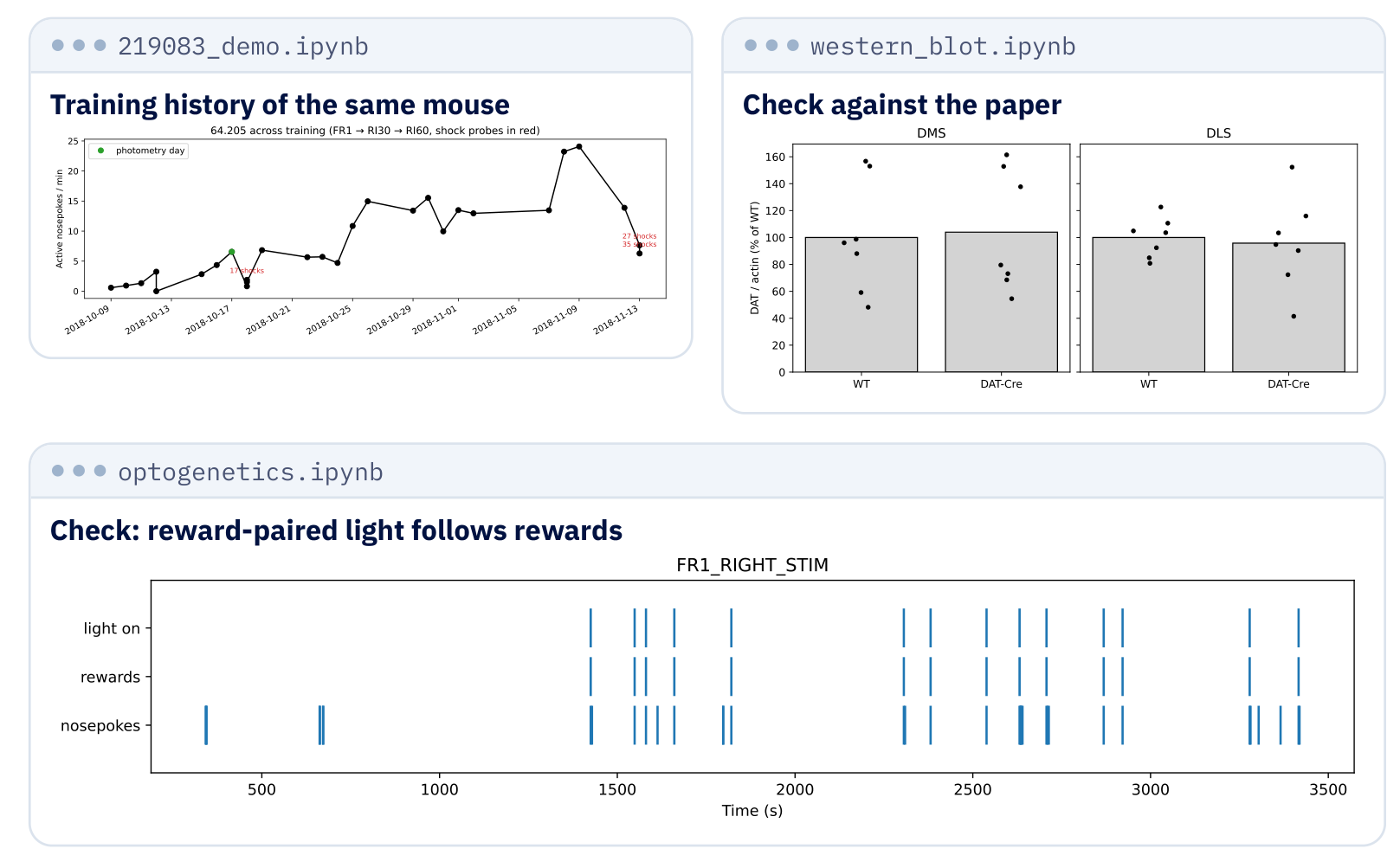
Review notebooks check each data stream against the lab’s source files and against the paper, so you can look at the converted data before anything is published.
Limits
- Review is still your job. The agent makes decisions on your behalf, and some will be wrong. It converted two sessions with corrupted photometry, which our engineers had excluded, and it gave only one of the two brain regions a correct atlas identifier. Read the review notebooks and the conversion notes before you publish.
- This is one dataset. We ran each configuration once, on one experiment. Results on other modalities and formats will differ.
- The scientist was simulated. A real lab member answers differently from a model with a fact sheet.
- It needs a paid Claude plan. Long conversions use a lot of tokens, and a very large dataset may reach the usage limits of the smaller plans.
Next steps
We are now testing other models and other agent tools with the same skill. Many are much cheaper than Claude Opus, and we will report which configurations reach similar results at the lowest cost.
The skill is free, open source and ready to use today, so try it on your own data. We would like to hear how it went. Please open an issue with what worked and what did not. If you would like our help with a conversion, get in touch.
Credits
Paul Adkisson-Floro built the benchmark and presented this work at SfN 2026 as poster PSTR339.15, with Szonja Weigl, Alessandra Trapani, Luiz Tauffer, Heberto Mayorquin, Eivind Hennestad and Ben Dichter. The figures of the skill and the notebooks come from the poster.
We thank the Lerner Lab at Northwestern University for collecting, analyzing and publishing the data behind the benchmark (Seiler et al., 2022).